We use cookies to make your experience better. To comply with the new e-Privacy directive, we need to ask for your consent to set the cookies. Learn more.

iWire AEM Inline Wideband Display Adapter for iDCCD

$99.99
SKU
ID-Harness-Wideband_Gauge-Kit-0


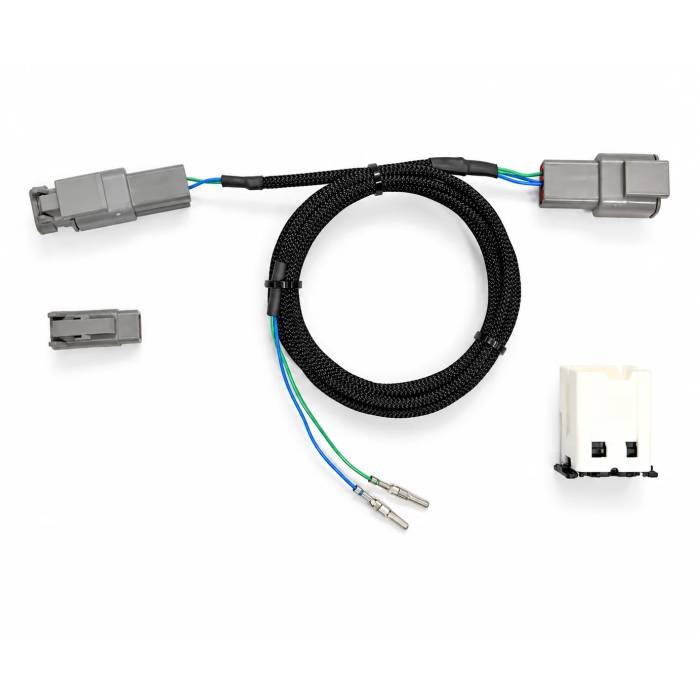
Your wideband has something to show you.
Connect your compatible inline AEM X-Series Inline Wideband to iDCCD and get more than a digital AFR gauge: live readings, additional supported AEM data, and helpful diagnostic information in the iWire Connect app.
The AEM Inline Wideband Display Adapter for iDCCD lets you view air/fuel ratio (AFR) data without installing an additional dashboard gauge. The adapter connects a compatible AEM X-Series Inline Wideband with iWire Plug-and-Play wiring to your iDCCD system so iWire Connect can display the wideband's live AFR reading along with other supported information broadcast by the AEM controller.
More than a replacement for a physical gauge, this connection gives you access to additional supported wideband information and diagnostic status in the app, helping you understand what the sensor is reporting and investigate potential issues. Designed for an existing compatible iDCCD setup, the harness connects the AEM wideband wiring to the iDCCD expansion harness. Supported firmware activation is included.
How It Works
The adapter harness connects the compatible AEM wideband wiring to your iDCCD expansion harness. With the wideband properly connected, the iWire Connect app can display its live AFR reading and other supported AEM-reported information through iDCCD.
You can check AFR without adding a separate physical gauge to your dashboard, and use available status and diagnostic information to help troubleshoot a wideband issue.
What You'll Need
- A compatible AEM X-Series Inline Wideband with the iWire Plug-and-Play kit
- An iDCCD controller and compatible expansion harness
- The iWire Connect app
Features
- ✓ Live AFR readings in the iWire Connect app
- ✓ Additional supported AEM wideband data beyond the AFR number
- ✓ Supported status and diagnostic information to help investigate wideband problems
- ✓ No additional dashboard AFR gauge required for the app display
- ✓ Adapter harness connects compatible AEM wideband wiring to an iDCCD expansion harness
- ✓ Supported firmware activation included—no separate software unlock purchase needed
What's Included
- Included: AEM-to-iDCCD adapter harness and supported firmware activation.
- Not included: AEM wideband controller or oxygen sensor, iDCCD controller, or separate physical gauge.
Important: Monitoring and Diagnostics, Not Engine Control
The AFR display and any additional wideband information need a properly connected, compatible AEM unit and supported firmware. Available readings and diagnostic details depend on the supported AEM data and iWire Connect software. Diagnostic information can help troubleshoot issues but does not replace proper testing. This integration does not change engine tuning, add AFR-based differential control, or provide engine protection.
WARNING: Operating, servicing and maintaining a passenger vehicle or off-road vehicle can expose you to chemicals including engine exhaust, carbon monoxide, phthalates, and lead, which are known to the State of California to cause cancer and birth defects or other reproductive harm. To minimize exposure, avoid breathing exhaust, do not idle the engine except as necessary, service your vehicle in a well-ventilated area and wear gloves or wash your hands frequently when servicing your vehicle. For more information go to P65Warnings
| SKU | ID-Harness-Wideband_Gauge-Kit-0 |
|---|---|
| Manufacturer's Part Number | ID-Harness-Wideband_Gauge-Kit-0 |
| Brand | I-Wire |